★★★★★
"Joel from Essence Automations designed an amazing website for our hardware business. He also created a Google Business Profile and optimized it so well, Oloolua Hardware is now ranking number 2 in Ngong."
Know what sold, who owes you, and what's actually making money, even on the days you're not at the shop. Hardware Manager is a web-app till that runs on any phone, laptop or tablet, and keeps your stock, credit and invoices straight.
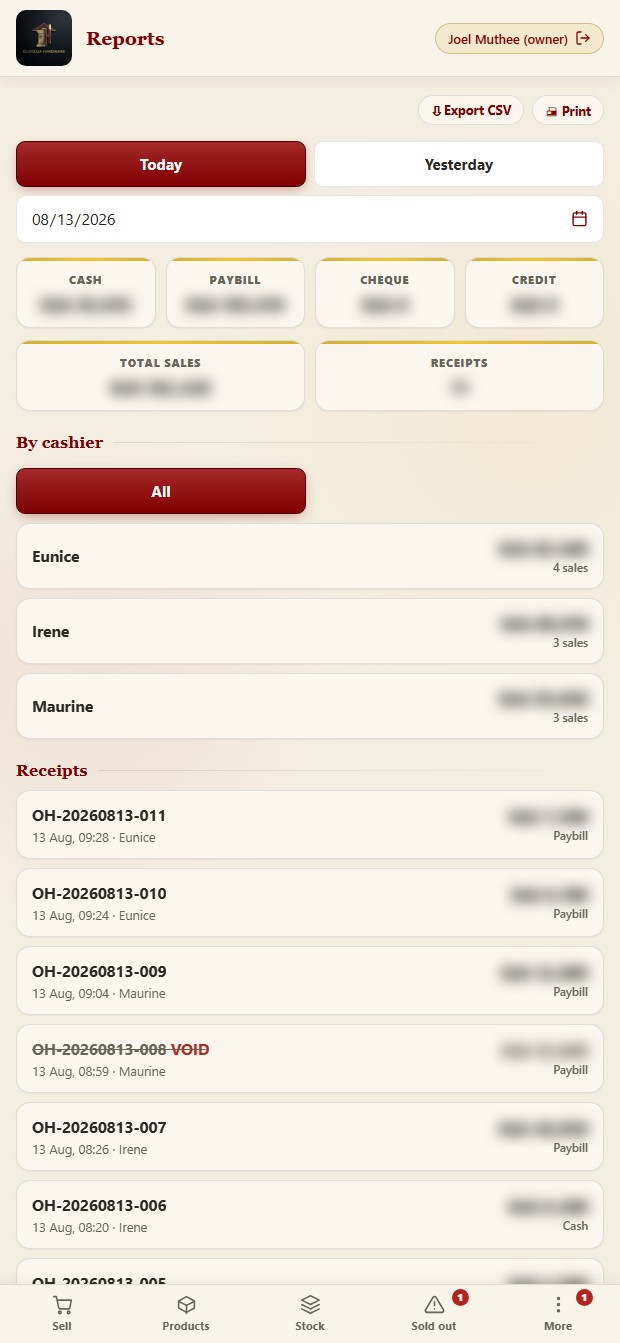
A real trading day at Oloolua Hardware, not a mock-up. Figures blurred, it is a real shop’s money.
See it work
Illustration of how it works
Hundreds of items, customers buying on credit, cheques that bounce, suppliers you owe, and KRA on your neck. A notebook and a good memory only stretch so far.
Customers buy today and pay later. Six months on, nobody's sure who owes what, or how much walked off unpaid.
Cement, nails, pipes, paint. Hundreds of SKUs moving daily. You only find out you're out when a customer asks for it.
Staff cut a price to make a sale and the shop quietly loses money on it. You never see which items are bleeding margin.
A business customer wants a proper tax invoice with your PIN, now. Handwriting it, or worse, promising to "send later."
Sell fast, keep stock honest, and always know who owes you and what you owe. The shop runs tighter, and you keep the margin that used to quietly leak away.
Make a sale in seconds. Search by name, pick the quantity, take payment. Change and till are worked out for you.
Every sale drops the count automatically. Set an alert level per item and the shop tells you what's running low.
Snap the supplier's delivery note and the shop reads the new buying prices straight off it. Check the lines, tap apply, and your costs are current without typing a hundred rows by hand.
Whoever sees the empty shelf marks it sold out. You know the moment it happens, and the counter can still serve the customer as a special buy.
Sold something you got from the shop next door? Record it against them. Who owes who is always clear, both ways.
Sell on credit, log part-payments, see each debtor's running balance. Nothing gets forgotten or "lost."
Track what you owe each supplier and settle it down over time. Your side of the credit, kept just as tight.
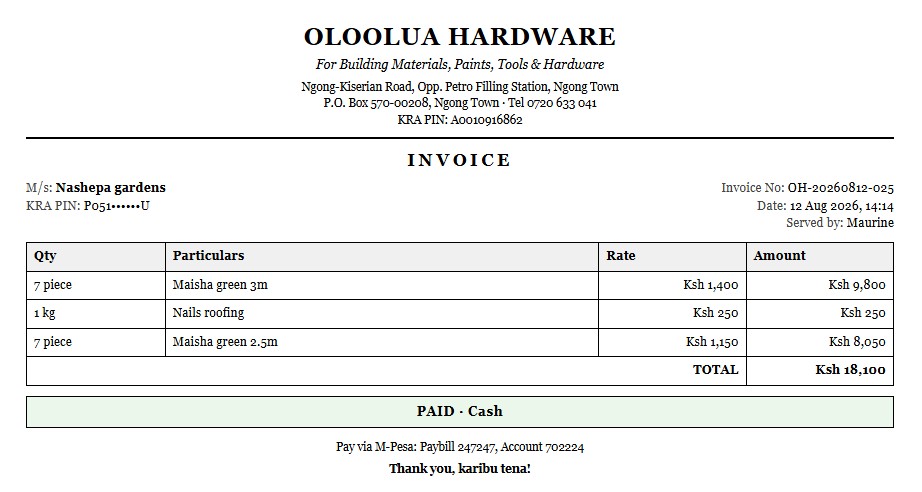
Turn any sale into a proper A4 tax invoice with the customer's M/s and PIN. Print it or save a PDF on the spot.
Build a quote for a contractor, print it, and turn it into a sale later without keying it all in again.
The till refuses to sell an item under its buying price, for anyone. Your margin is protected even when you're away.
Close the day and the shop shows expected cash, M-Pesa and cheques against what's actually in the drawer.
Owner, admin, cashier and accountant. Everyone sees only what their job needs. The money reports stay yours.
Your sellers see who is leading today and this week, by money sold and by receipts written. A quiet afternoon turns into a friendly race. They never see your buying prices or profit.
Daily takings, profit, best sellers, dead stock. See what's actually making money, not just what's busy.
Power or network down? Keep selling. It's a web app on any phone, laptop or tablet, and it syncs when you're back.
Get a push on your phone for the day's summary and low-stock warnings, even when you're not at the shop.
Close the sale and the thermal printer prints it. Nothing to tap, no phone tied up at the counter. If the printer is off, the job waits and prints when it comes back.
A 50kg bag of nails takes 50 off your kilo count on its own. Same product whether they take the whole bag or two kilos loose, so you keep one stock figure instead of two that never agree.
A customer leaves cash to order against later. It shows as money held for them, in their name, not as a payment nobody can explain a month later.
Type a company’s name, KRA PIN, contact and phone once. The next time they buy, the tax invoice fills itself in.
Counter, stock, credit, suppliers and KRA paperwork in one system that actually adds up.

It's a web app. Open it in any browser on a phone, laptop or tablet, no special till machine to buy. Add it to the home screen and it opens like a normal app.
Highly flexible. We shape it around how your shop actually runs, and it's not locked to hardware, the same engine can be tailored to fit almost any business.
From your product list to a branded, working system with your team trained, we usually have you live in around three days.
Hardware money comes in four shapes, and every one is handled properly, printed on the receipt, and counted at day's end.
Type what's tendered, the change is worked out, the drawer is tracked.
Your paybill and account number print right on the receipt, so buyers pay correctly.
Recorded against the sale and reconciled with the day's banking.
Booked to the customer's ledger with a running balance you can chase later.
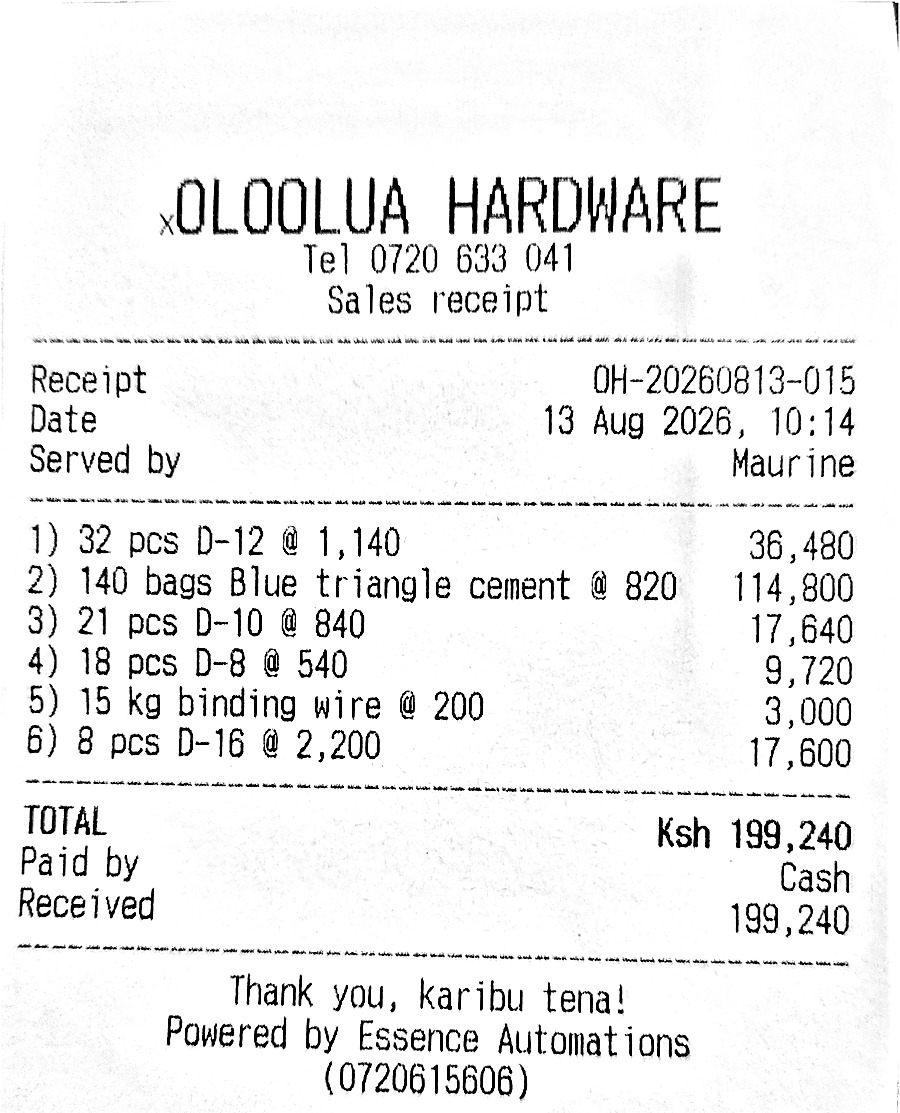
In most hardwares the counter takes the money and a separate store hands over the heavy goods. That gap is where stock quietly walks. Hardware Manager tracks every order from paid to picked up.
The system already knows which goods live in the yard, so cement, chuma, tanks and mabati tick themselves as the cart is built. The seller can change any line, and the catalogue remembers the answer for next time. Whatever is ticked joins a pending list until the goods are actually handed over, with how long each one has been waiting on the screen.
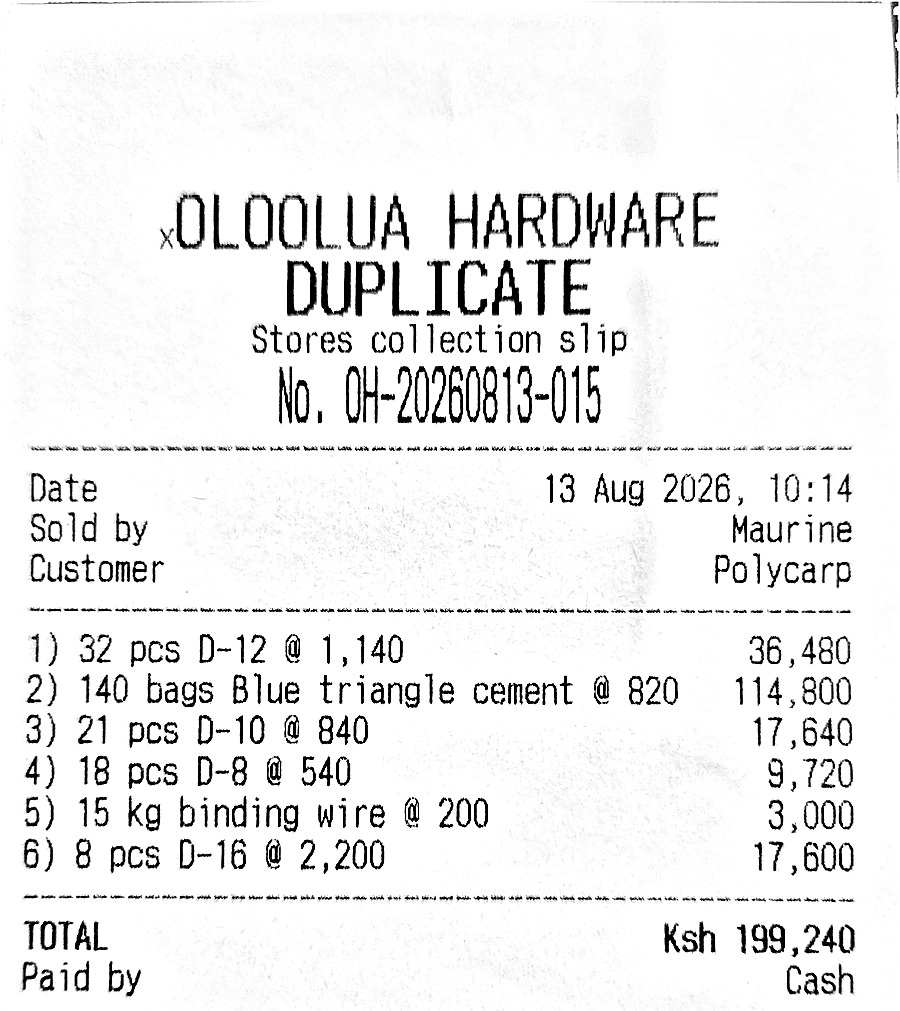
Stores has no wifi, so this slip is the whole handover. Big receipt number, every line with its quantity and price, and the total. It is printed off the same sale as the receipt, so the two can never disagree.
Big orders can be picked up bit by bit. Whatever's left stays on the list until it's all gone.
When a load is going out, the store copy carries where it is going and who receives it at the site with their number, which is usually a fundi rather than the person who paid. None of that prints on the customer’s own receipt.
A manager-only check matches the day's released goods against the filed slips, and flags any paid order whose goods never left.
A customer takes materials on Friday and you write the invoice when they pay. That is normal hardware trade, and in most shops it lives in a handwritten note that never touches stock. Hardware Manager records it properly.
Pick the products the way you would sell them and attach the customer. Stock comes off as the goods go, but the day's takings stay untouched until you write the invoice.
It sits on that customer's account as goods out, not invoiced, right next to their invoiced debt and never mixed into it.
They pay 10,000 on Friday and the rest when their own money comes in. What's outstanding is what's actually left, on every screen that shows it.
Hand a customer a dated statement showing what they owe on invoices, what has gone out and isn't invoiced yet, and the total. Print it or save a PDF.
Anyone at the counter can issue goods, that's counter work. Only a manager can cancel a note and return the stock, because that's the move that could hide a loss.
Mark a load sent out and the whole shop sees it. Each one still waiting shows how long it has been waiting, and yesterday's shows in red. Name the driver, or record that the customer carried it off on their own tuktuk.
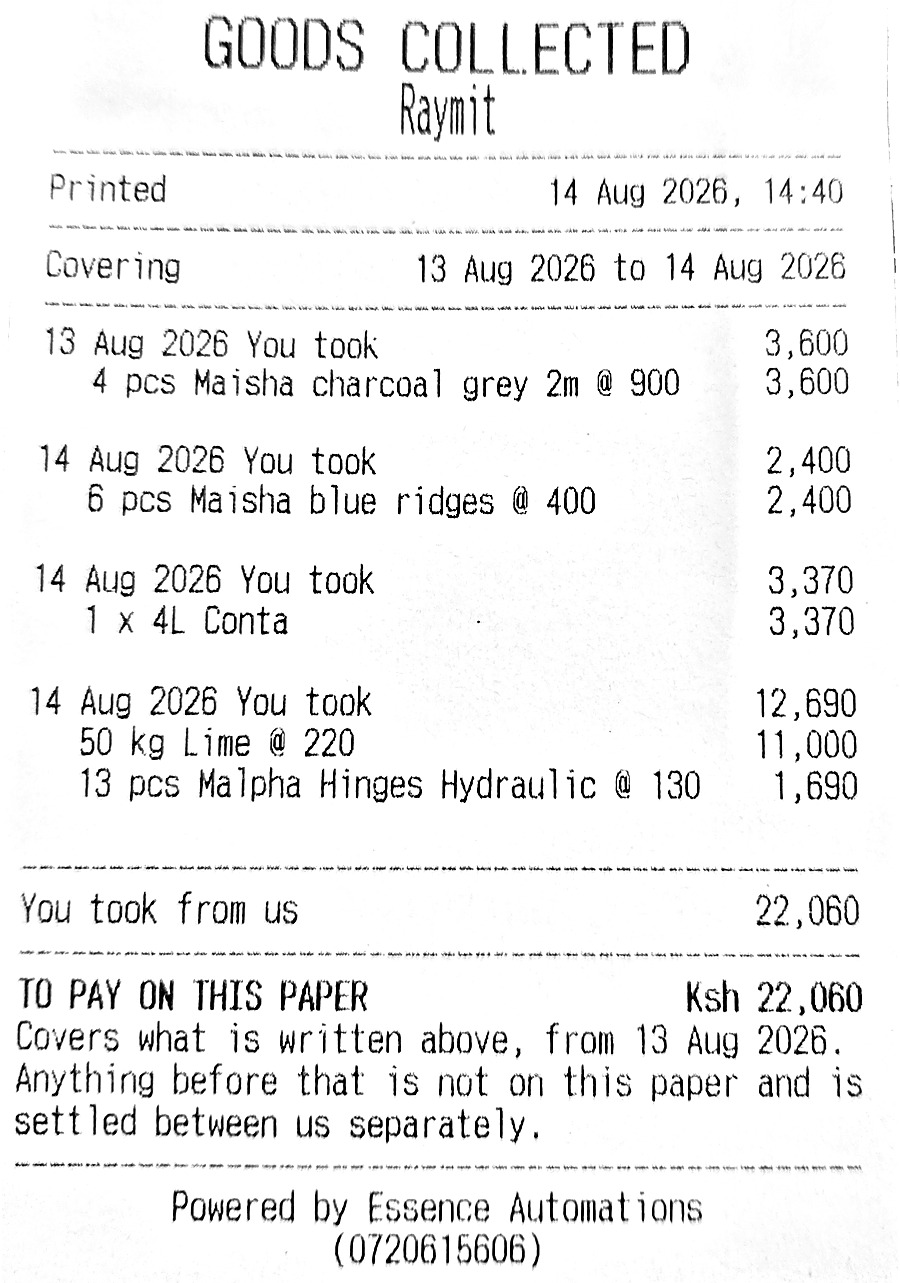
Hardwares lend each other stock all week. Whoever is short sends someone next door, and by the time you sit down to settle, nobody agrees on what was taken. Hardware Manager keeps that running both ways and prints the paper you hand over.
Sold something you got from the shop next door? Book it against them there and then. The list builds itself through the week instead of being remembered at the end of it.
Every line shows what was actually taken, right down to 4 pieces of charcoal grey at 900. A bare figure is something the other shop has no way to check, so it gets argued with.
Choose the period and print the statement on the same counter printer. The paper and the screen are built from the same place, so the two can never disagree.
It says you took and you paid, because it is a document you put in someone's hand across a counter, not a note you keep about them.
The total reads to pay on this paper, and says outright that anything from before you started is settled between the two of you separately. You cannot be argued out of a number the paper never claimed.
They pay 1,200 against 1,800 and the line itself says part paid, 600 still owed. Payments clear the oldest load first, so every collection reads paid, part paid or still owed instead of leaving you to work it out from one running total.
A trade sale prints nothing, so the line is the only trace of it. Tap it and the receipt opens, with the items on it. You settle looking at the goods, not at a number somebody typed.
They collect when they are short, you collect when you are. Their payment can never quietly pay down what you owe them, because the two run as separate columns.
We do the heavy lifting and shape it to your shop. You practise in a safe test mode, then flip the switch and start trading for real.
We build your product list with you, brand it to your shop, load your paybill and KRA PIN, and shape it around how you work. You do not need a spreadsheet or an old system to start from.
The shop starts in test mode. Cashiers make pretend sales, learn the flow, and get comfortable, with nothing counted as real.
Flip to live, do one stock take to set real counts, fill in prices, and trade. Your staff each get their own PIN and role.
Hardware Manager runs the counter at a working Nairobi hardware shop, every feature here earned its place solving a real problem on the shop floor. Yours gets set up the same way, branded to your shop.
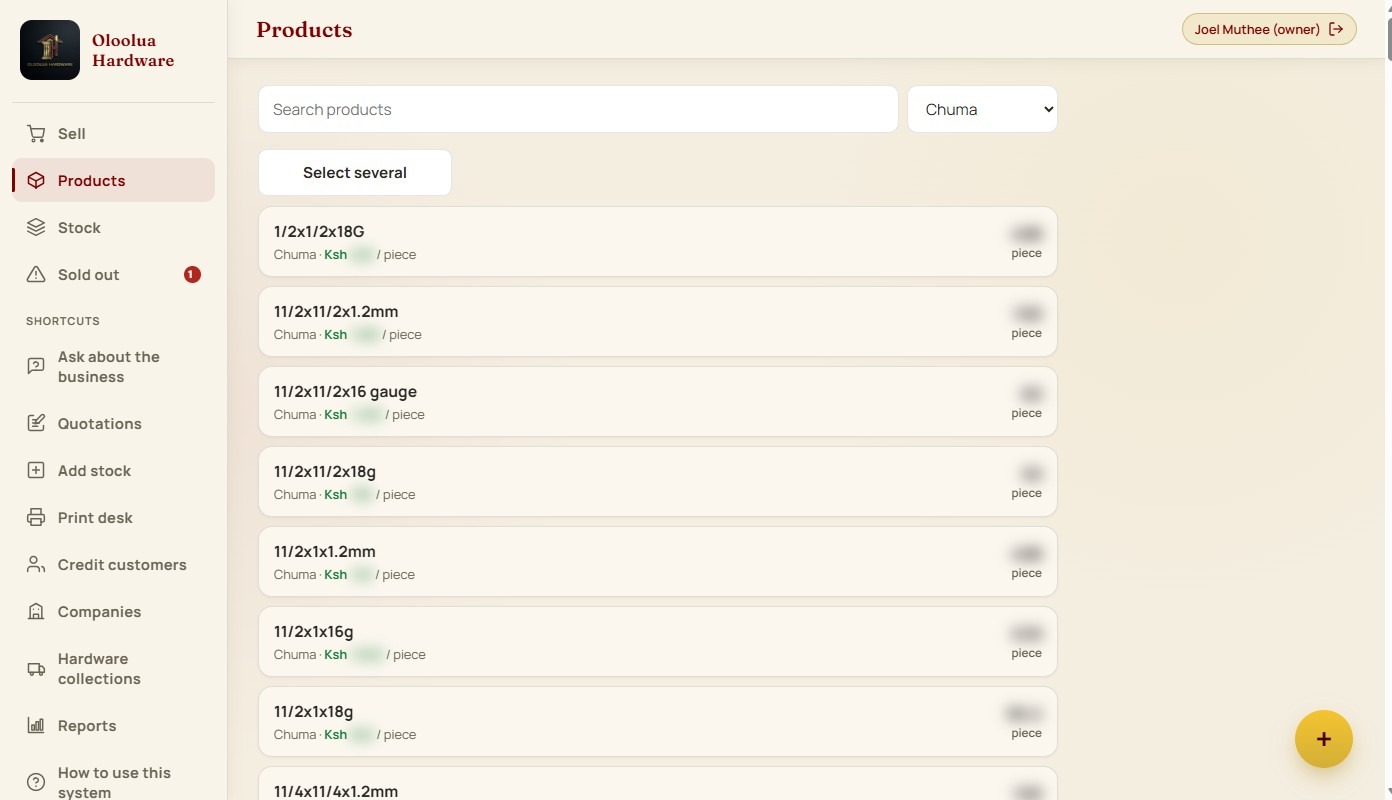
Search the shelf from the counter. Each item carries its category, its price per unit and what is left, so the customer asking for one length gets the same answer as the one buying a full bundle.
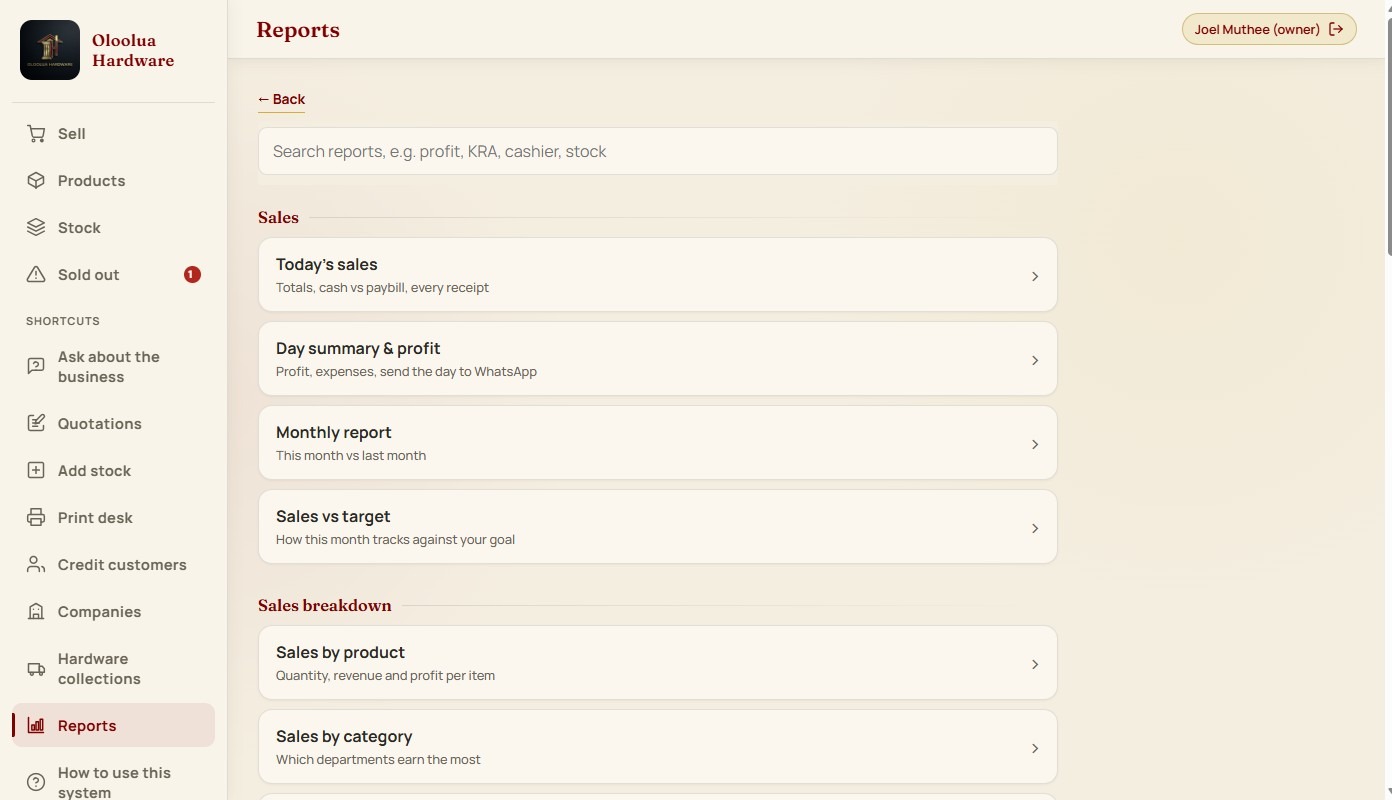
Totals, cash against paybill, profit once expenses are in, and this month against last. Close up and send the day to WhatsApp before you lock the door.
Any sale becomes a full A4 tax invoice carrying your shop's KRA PIN and the customer's company name and PIN. No retyping it into Excel that evening, no promising to send it tomorrow and then forgetting.

I've watched hardware owners run the whole shop on trust, memory and a worn notebook. Customers buy on credit and it's never chased. Cement leaves the store and nobody's sure it was paid for. The stock count is a guess. The systems on offer were built for supermarkets, not for a hardware.
So I built one that was. Working with a real Nairobi hardware, on the shop floor, every feature here earned its place solving a problem an owner actually had that day, not one a developer imagined.
The result is a system a hardware owner can genuinely run and trust, whether they're standing at the counter or away for the week. That's the whole point of it.
Not all of them run hardware shops, but they all trusted us to build and deliver. Same hands building yours.
No packages, no locked features. Every shop gets the whole thing, set up and branded for you. Most shops pay for the first year upfront: setup is included and the 12th month is on us.
Questions about setup or billing? Just ask on WhatsApp, no pressure.
Same system underneath, shaped for how that business actually works.
Track sales, stock and customers from your phone. Online shop with M-Pesa.
See Shop Manager → Websites that win workFast, mobile-first sites built for sales. 20+ live client sites you can go and look at.
See Websites that win work → AI Support ChatAnswers customers on your website 24/7. Recommends the right service and books appointments.
See AI Support Chat →Run something else? Tell us what you do and we'll build a Manager for it.
💬 Suggest a Manager for my businessA shop’s takings, its margins and who it buys from are the most private things it has, and the easiest to lose. Here is who can see yours, and what keeps them safe.
Your shop gets its own database. It is not a folder inside somebody else’s system, and your sales are never sitting in the same place as another hardware’s.
You create the accounts for your own people and set what each one can see. Cashiers never see cost or profit. Nobody outside your shop holds a login unless you make them one.
No trackers, no analytics, no advertising pixels anywhere in the system. It reports to your screens and nowhere else.
I run a hardware myself, so I know exactly what your figures are worth to the wrong pair of eyes. Your takings, your margins and who you buy from are yours. I open your books only if you ask me to look at something, and not otherwise. Joel Muthee, Essence Automations
Photograph a supplier invoice or ask the system a question and that one photo or question is sent to be read. Nothing else goes with it, and every single time it happens is written down in your own system with what it cost.
A notebook can be lost, soaked or carried off, and a laptop can be stolen with the whole year inside it. Your records are not kept on the till. They are in the cloud, saved as your people work and backed up on their own. If every phone and laptop in the building disappeared tonight, you would sign in on a borrowed one tomorrow and find everything where you left it.
Export the lot whenever you want, in a file that opens in Excel. It is your data on the way in and on the way out.
Any of them. Hardware Manager is a web app, it runs in the browser on a phone, laptop or tablet, so you can sell from a counter laptop and check the shop from your phone at home. Add it to the home screen and it opens like a normal app. No special till machine needed.
Yes, it's highly customizable. We shape it around how your shop actually runs, your categories, units, receipt and invoice layout, roles and prices. It's not locked to hardware either, the same system can be tailored to fit almost any business.
No. It runs on the phone, tablet or laptop you already have, through the browser. A cheap thermal printer for receipts and an A4 printer for invoices are all you'd add, and you may already have them.
You keep selling. It works offline and syncs your sales back up once you're reconnected, so the counter never stops.
That is normal, and it is not a problem. Building the catalogue is part of the setup we do for you. If you already have a list we work from that, and if everything is in your head and on the shelves, we start from a hardware catalogue that already exists and shape it to what you actually stock.
Only if you let them. Each person gets a role, cashiers sell and add stock, an admin runs the floor, and the profit and money reports stay with you as the owner.
Yes, this is a core part of it. Every credit sale books to that customer's ledger with a running balance, and you record part-payments as they pay down. You always know who owes what.
Yes, that's exactly what the Stores collection feature is for. Pay at the counter, and the buyer carries a printed collection slip to the store with a big receipt number, every item and its price, and the total. Goods can be picked up in parts, and a daily manager check flags any paid order whose goods never left. Works even where the store has no wifi.
Yes, and it is one of the things the system was built for. Issue the goods against the customer, picking the products the same way you would sell them, and the stock comes off as they go. It sits on their account as goods out, not invoiced, so it never lands in the day's takings twice. Record part-payments as they come in, and close the note when you write the invoice.
Yes. Anything going out sits on a delivery queue showing how long it has been waiting, and yesterday's loads show in red so nothing gets skipped quietly. You name the driver, or record that the customer took it away on their own tuktuk or pickup, which keeps your driver trip counts honest.
Yes, and in both directions. Record what you take from them and what they take from you as it happens, then pick a date range and print a statement to hand over when you settle. Each line lists the actual goods, not just an amount, and the total covers only the dates on that paper, so anything from before you started the system stays between the two shops.
Yes. Finish the sale and the thermal printer prints it, with no app to tap and no phone tied up at the counter. If the printer is off or unplugged the job waits in line and prints once it is back, so a receipt is never lost.
Yes. Any sale can become a full A4 tax invoice with your shop's KRA PIN and the customer's M/s and PIN, ready to print or save as a PDF.
Pay for the year and use it for 30 days. If it is not for you, tell us and you get every shilling back, no questions asked. On the monthly plan the setup fee is not refundable, because that work is already done.
No. There's one system and everything is included, POS, stock, credit and supplier ledgers, KRA invoices, quotations, reports, the lot. Pay Ksh 125,000 for the first year, setup included, or Ksh 70,000 to implement, then Ksh 5,000 a month.
A basic till rings up sales. This one also runs your business with other hardwares, transport on the receipt, KRA PIN sales for your accountant, a seller leaderboard, quotes that turn into receipts, and your credit customers' books. One debt nobody chased, or one lorry trip nobody charged for, costs more than the difference.
Cloud hosting, automatic backups, updates as the system improves, and support when you need it. Paying monthly has a 6-month minimum. Paying for the year upfront includes setup and gives you the 12th month free.
Three days at most, or your next month is on us. We start from our ready list of over 5,000 hardware products, load yours, brand it and shape it to your shop, your team practises in test mode, then you go live, do one stock take, and start trading.
Because you can. Tell us about your shop and we'll set you up, branded to you and shaped to how you work, live in about three days.